
Download Cuckoo – customizable clock chimes for Mac
Overview
Cuckoo is a lightweight, trial‑version Mac utility that brings classic clock‑chime charm to modern desktops. Belonging to the Productivity category and specifically the “Clocks, Alarms & Reminders” sub‑category, Cuckoo lets users personalize the sound and timing of hourly chimes, quarter‑hour alerts, and even custom‑named reminders. The current version, 1.2.0, was last updated on 27 December 2007 and remains fully compatible with macOS X and earlier releases.
Despite its age, the app’s small footprint—requiring far less disk space than many contemporary productivity tools—makes it an attractive option for users who want a simple, non‑intrusive way to keep track of time without cluttering their screen. Since its addition to the catalog in 2006, Cuckoo has accumulated 827 downloads, a testament to its steady, niche popularity among Mac enthusiasts who value a classic auditory cue over visual notifications. The software is available in English, and its trial version offers a risk‑free way to evaluate the feature set before committing to the full purchase.
Whether you need a gentle hourly reminder while you work, a nostalgic cuckoo‑bird sound for a home office, or a customizable alarm for specific tasks, Cuckoo provides a secure, easy‑to‑install solution that blends seamlessly with macOS aesthetics.
Key Features & Installation Guide
Feature List
- Customizable chime sounds – choose from classic cuckoo, bell, or upload your own audio files.
- Hourly, quarter‑hour, and minute‑interval alerts – configure the exact times you want to be notified.
- Personalized reminder labels – assign text to each chime for task‑specific cues.
- Lightweight design – under 5 MB of disk space, ensuring minimal impact on system performance.
- Trial version with full feature access – evaluate all capabilities before purchasing the license.
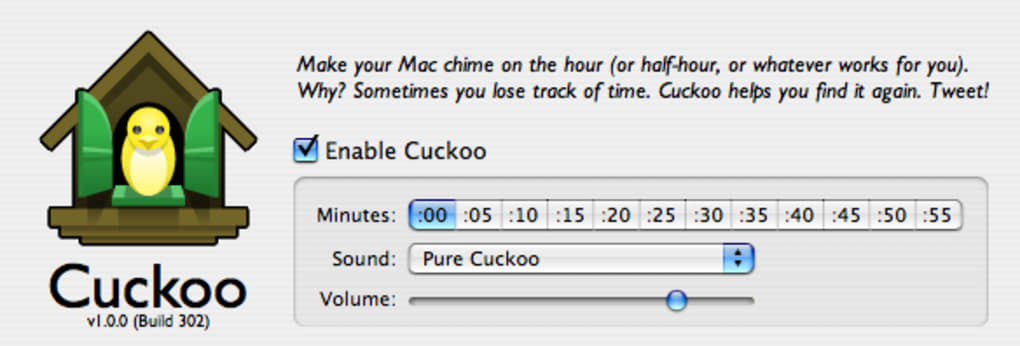
- Simple preferences pane – adjust volume, timing, and visual indicators with a few clicks.
- Automatic start‑up – option to launch Cuckoo at login for uninterrupted time‑keeping.
Installation & Usage Instructions
Installing Cuckoo on a Mac is straightforward and mirrors the typical macOS software‑installation flow. Begin by downloading the trial installer from the official product page. Once the .dmg file is saved, double‑click to mount the disk image. Drag the Cuckoo application icon into the Applications folder, or use the provided installer script for an automated placement. After copying, eject the disk image and locate Cuckoo in the Applications directory.
The first launch will trigger a security prompt asking for permission to open an app from an unidentified developer. Click “Open” to proceed. Cuckoo then presents a welcome window where you can select your preferred chime sound, set the interval schedule (hourly, every 15 minutes, etc.), and assign optional text labels for each alert. All settings are saved in the user’s Library folder, guaranteeing that preferences persist across reboots.
To customize sounds, click the “Sound Library” button and browse your local audio files. Supported formats include .mp3, .wav, and .aiff. Once a new sound is selected, a preview plays, allowing you to confirm the choice before saving. For visual cues, Cuckoo can display a small overlay icon in the menu bar that changes color when a chime is active. Users who prefer a silent mode can mute the audio while retaining the visual indicator.
Updating Cuckoo is handled via the built‑in “Check for Updates” feature, which contacts the developer’s server and prompts you to download the latest version. Because the software is lightweight, updates typically complete within seconds, preserving your custom settings. The trial version imposes no artificial feature lock; you receive the full experience for a limited period, after which a purchase key unlocks permanent use.
Compatibility, Pros & Cons
Cuckoo is designed specifically for macOS X and earlier Mac operating systems. It runs smoothly on versions from macOS 10.4 (Tiger) up through macOS 10.7 (Lion) and is known to work on newer releases with minimal compatibility adjustments. Because the application relies only on native macOS frameworks, it does not require additional runtime libraries or virtual machines, keeping the installation clean and secure.
Pros
- Extremely low system resource usage – ideal for older Mac hardware.
- Highly customizable audio alerts – users can upload personal sound files.
- Simple, intuitive UI that matches macOS design conventions.
- Free trial provides full feature access, allowing an honest evaluation.
- Automatic start‑up option ensures continuous time‑keeping without manual intervention.
Cons
- Last major update was in 2007, so some modern macOS features (e.g., Dark Mode) are not natively supported.
- Only available in English, limiting accessibility for non‑English speakers.
- Trial version does not include a built‑in purchase flow; users must manually request a license key.
- Lacks advanced alarm features such as calendar integration or snooze functionality.
- No mobile companion app for iOS or Android, restricting usage to desktop environments.
Overall, Cuckoo delivers a pleasant, customizable chime experience for Mac users who appreciate classic time‑keeping sounds without the bloat of modern alarm apps. Its simplicity is both its greatest strength and a limitation, making it perfect for users who need a straightforward reminder tool rather than a full‑featured scheduler.
FAQ & Conclusion – Get Started with Cuckoo Today
Is Cuckoo free or do I need to purchase a license?
Cuckoo offers a fully functional trial version that can be used indefinitely for evaluation. To continue using the software after the trial period, you must purchase a license key, which unlocks permanent access.
Can I use my own sound files for the chimes?
Yes. Cuckoo supports custom audio files in .mp3, .wav, and .aiff formats. You can import any sound you prefer through the Sound Library panel.
Will Cuckoo work on macOS Big Sur or Monterey?
Although the last official update was in 2007, Cuckoo runs on macOS Big Sur and Monterey because it relies on core system frameworks. Some visual elements may not fully match the newest UI styles, but functionality remains intact.
Does Cuckoo support calendar integration?
No. Cuckoo focuses on simple time‑based chimes and does not integrate with calendar applications. Users needing calendar sync should consider complementary tools.
How do I purchase the full version?
After the trial expires, you can buy a license directly from the developer’s website. Once the purchase is complete, you receive a license key that you enter in the application’s Preferences pane to unlock the full version.
In summary, Cuckoo offers a niche yet valuable solution for Mac users who want a classic, customizable clock‑chime experience without sacrificing system performance. Its straightforward installation, low memory footprint, and ability to use personal audio files make it stand out among other reminder utilities. While the software does not boast the latest macOS visual enhancements or deep calendar integration, its core functionality—delivering reliable, audible time cues—remains solid. If you’re looking for a simple, secure tool to keep you aware of the passing hours, Cuckoo is a worthwhile download. Click the button below to start your free trial and bring the gentle sound of a cuckoo clock to your Mac desktop today.







